Beginner's Guide to Filming a Slow Orbit Around a Ferris Wheel
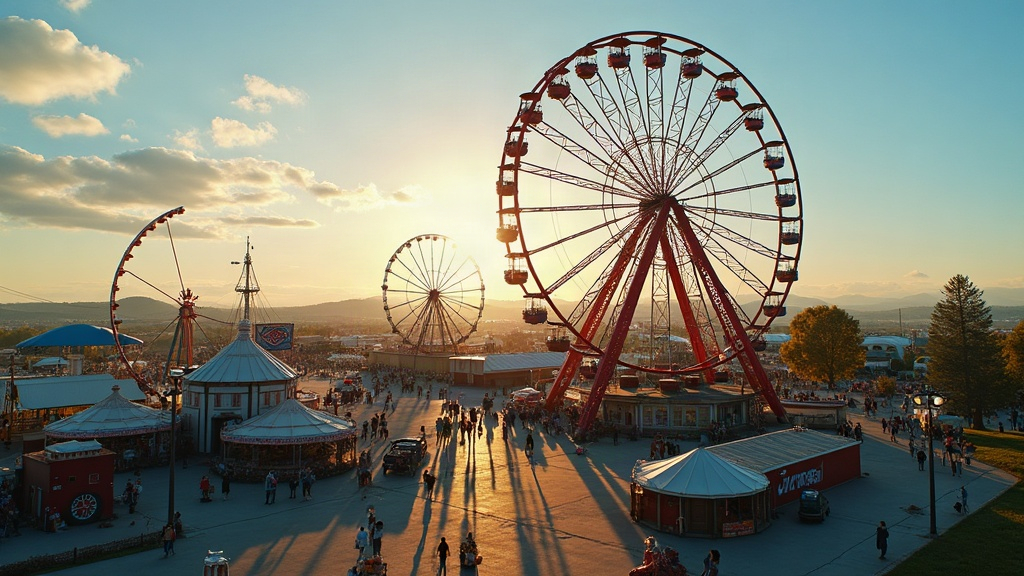
A slow orbit around a county fair Ferris wheel might be the single most satisfying shot a beginner drone pilot can pull off. It takes a simple carnival ride and turns it into a glowing centerpiece that looks like it came off a film set. This guide walks through the planning, the settings, and the actual flight technique you need to nail that smooth, professional circle shot, even if you’ve never attempted an orbit before.
Why the Ferris Wheel Orbit Works So Well
Think about what makes a Ferris wheel such a gift for an orbit shot:
- It’s symmetrical and tall, so the camera gets a clean vertical anchor to lock onto
- It’s lit up at night, which creates sharp contrast against a dark sky
- It’s already moving, slowly and constantly, adding motion to your shot without you lifting a finger
- It sits inside a sea of fair lights, rides, and crowds, giving the background real depth and color
Put those together and the orbit feels alive even though your drone is barely doing anything fast.
Planning the Shot
Scout Before You Fly
Walk the fairgrounds on foot first, before you ever send the drone up. Look for:
- Power lines, light poles, and flagpoles anywhere near the wheel
- How crowd density shifts through the evening (7 PM is a different animal than 9:30 PM)
- The best lighting window, usually just after sunset during “blue hour,” when the sky still holds some color but the ride lights really start to pop
Check Local Rules
A lot of fairs have drone restrictions simply because of crowd size and how close rides sit to walkways. So:
- Talk to fair organizers or event staff before you fly, not after
- Don’t fly directly over people. Most drone regulations forbid it outright
- Stay back at least 30 to 50 feet horizontally from the ride structure itself
Camera and Drone Settings
For an orbit that looks smooth and polished rather than jittery:
- Frame rate: 24fps or 30fps gets you that cinematic look
- Shutter speed: roughly double your frame rate (so 1/50 at 24fps)
- ISO: as low as the lighting will let you go, otherwise the night sky turns grainy fast
- Gimbal mode: use “Follow,” locked on the subject, not “FPV.” You want the horizon staying level, not swinging around
- Flight mode: if your drone has a POI or auto “Orbit” mode, start there and fine-tune manually from that baseline
Flying the Orbit: Step-by-Step
- Hover at a fixed radius. Park the drone somewhere around 100 to 150 feet from the wheel’s center, at a height just below or level with the top rim. That angle flatters the shot more than you’d expect.
- Lock the subject in frame. Use point-of-interest lock if your drone offers it. If not, you’ll be making small stick corrections the whole time to keep the wheel dead center.
- Fly in slow, consistent arcs. Steady, continuous pressure on the stick, not quick bursts. A full 360° orbit should take somewhere around 45 to 60 seconds if you want that genuinely “slow” feel.
- Nudge the altitude slightly as you go. A tiny rise or dip during the circle adds depth to the shot without making it look shaky or uncertain.
- Keep gimbal tilt changes small and slow. Sudden tilts read as reactive. Slow, deliberate ones read as intentional, which is the whole point.
Common Mistakes Beginners Make
- Flying too fast. A quick orbit looks more like security footage than a cinematic shot. Slow down well past the point where it feels natural, because it isn’t supposed to feel natural at first.
- Letting the radius drift. Creeping closer or farther from the wheel wrecks the illusion of a clean circle. Light taps on the stick, not big corrections, keep your distance consistent.
- Not accounting for wind. Even a mild breeze will push you off your arc. Fix it with small, continuous nudges rather than waiting and overcorrecting later.
- Missing the exposure shift. As you circle the wheel, its lights go from backlit to front-lit and back again. If your drone allows mid-flight exposure compensation, ride it gently through that transition.
Post-Flight Editing Tips
- Stabilize in post if there’s minor shake, but go easy on it. Over-smoothing can actually warp the straight lines in the wheel’s frame, which looks worse than the original shake.
- Push a little warmth into the color grade. Carnival lights come alive with slightly boosted saturation and a warmer white balance.
- Cut the orbit down to its best 15 to 20 seconds for social media, but hang on to the full clip too, it’s worth keeping for a longer project down the line.
Final Thoughts
A slow orbit around a county fair Ferris wheel is well within reach for a beginner, and it pays off more than most first projects do. Scout the location, dial in your settings, fly patiently, and you end up with a shot that could pass for something out of a travel documentary, not a weekend hobby clip. Start slower than you think you need to, work on holding that radius steady, and let the wheel’s own motion carry half the work for you.